Breathable Ergonomic Mesh Office Chair: Height + 3D Arms
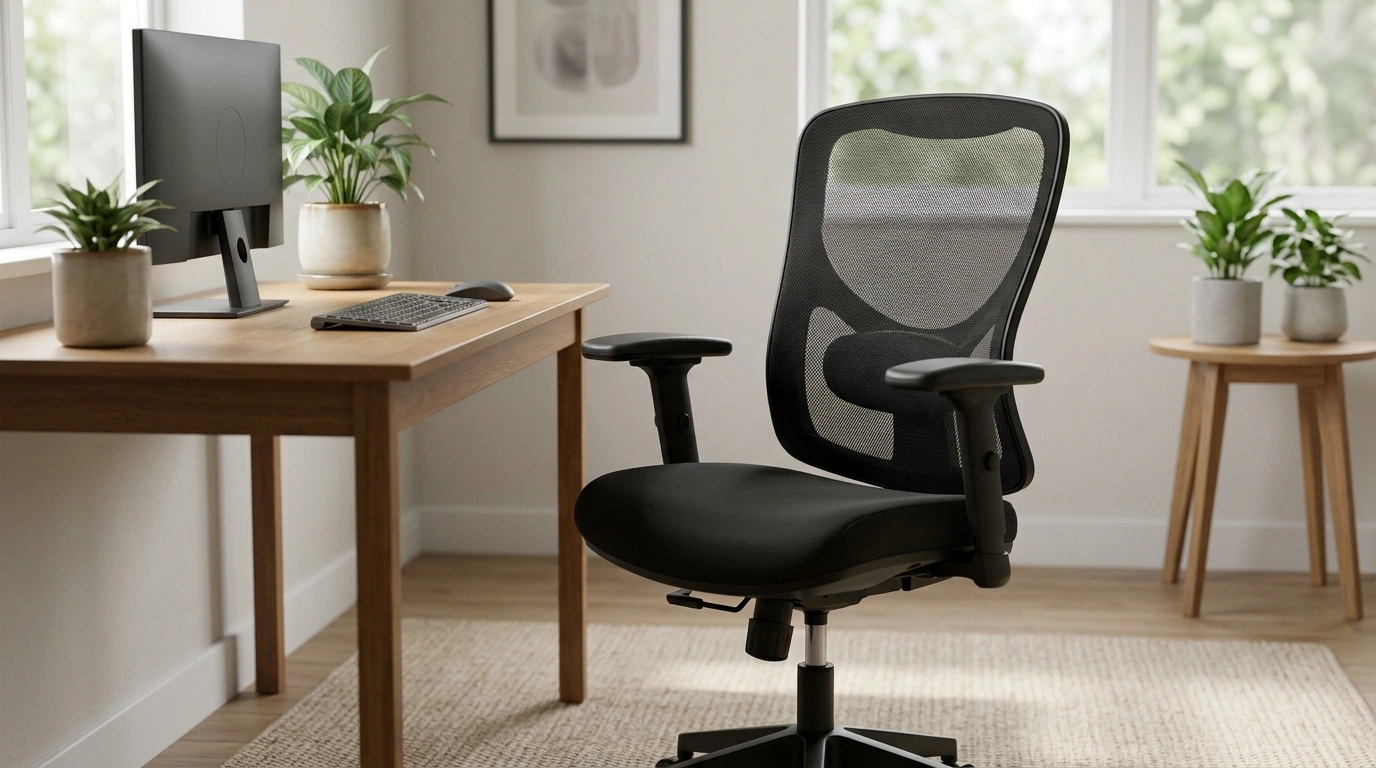
Breathable, Adjustable Support for Workdays That Don’t Quit
A supportive desk chair should adapt to the body, not the other way around. The Ergonomic Mesh Backrest Office Chair with Adjustable Height and 3D Armrest combines breathable support with flexible adjustments to help maintain a comfortable seated posture through long work sessions, study time, and everyday home-office use. The goal isn’t to “sit perfectly” all day—it’s to stay comfortable while your chair supports small posture shifts, different tasks, and changing desk setups.
What makes this chair feel supportive
- Mesh backrest promotes airflow to reduce heat buildup during extended sitting, especially in warmer rooms or compact workspaces.
- Ergonomic back shape encourages an upright posture and steadier upper-back support, so the torso feels more “held” rather than slumped.
- Adjustable seat height helps align hips and knees for a more stable seated position and easier alignment with standard desk heights.
- 3D armrests adapt to different tasks (typing, mousing, reading, or video calls) by letting arm support move with you instead of forcing your shoulders upward or outward.
Key adjustments and how to dial them in
Most comfort issues come down to one of three things: seat height, armrest placement, or how fully you’re using the backrest. A few small tweaks can change how your neck, shoulders, and lower body feel by the end of the day.
- Seat height: Set the chair so feet rest flat and knees are roughly level with (or slightly below) hips. If your desk is high, raise the seat; if your thighs feel compressed, lower it.
- Armrest height: Raise or lower until shoulders feel relaxed and elbows rest comfortably near the sides—no shrugging to “reach” the armrests.
- Armrest depth/position: Slide or angle the armrests so forearms are supported without forcing your wrists upward against the desk edge.
- Back contact: Sit all the way back so the backrest supports the torso. Perching forward tends to overload the neck and upper back over time.
For workstation guidance that matches common office setups, the OSHA Computer Workstations eTool is a practical reference for monitor height, keyboard placement, and neutral posture basics.
OSHA Computer Workstations eTool
Mesh backrest benefits for all-day comfort
- Breathability: Mesh helps reduce sweating compared with solid upholstery, which can feel warmer during long stretches at the desk.
- Flexible support: The surface can feel less rigid during micro-movements—those constant small shifts that happen while writing, thinking, or switching between tabs.
- Lower-maintenance feel: Mesh typically resists trapping lint and excess heat compared with plush fabric, which can feel “stuffy” in small rooms.
- Great for mixed-use spaces: In a home office, bedroom desk, or studio corner, ventilation and easy comfort matter as much as looks.
At-a-glance feature checklist
Before ordering and during setup, use this checklist to confirm fit and function. Pay special attention to how the chair interacts with your desk: armrest clearance, seat height range, and available floor space. If you use a standing desk, confirm the seat height can match the desk’s seated position.
| Feature | Adjustment/Detail | Why it matters |
|---|---|---|
| Mesh backrest | Breathable support surface | Helps manage heat and supports the upper body |
| Adjustable seat height | Raises/lowers seat | Improves leg comfort and desk alignment |
| 3D armrests | Multi-direction arm support | Reduces shoulder/forearm strain during typing and mousing |
| Everyday desk compatibility | Fits common workstation setups | Helps maintain a consistent posture across tasks |
Comfort tips for long sessions
- Take short movement breaks: Stand up, roll shoulders, and reset posture every 30–60 minutes when possible. Small breaks add up.
- Keep the monitor at a comfortable height: Aim for a neutral neck position instead of craning down toward a laptop.
- Place keyboard and mouse close: Keep elbows near the body and wrists neutral; reaching forward can build shoulder tension quickly.
- Add a footrest if needed: If you raise the seat for desk height and feet don’t reach the floor comfortably, a footrest can stabilize the lower body.
For more on preventing strain during repetitive or prolonged tasks, NIOSH provides a useful overview of ergonomics and musculoskeletal considerations.
NIOSH Ergonomics and Musculoskeletal Disorders
Setup and care for a longer-lasting chair
Who this chair suits best
Related picks for a more comfortable routine
- Ergonomic Mesh Backrest Office Chair with Adjustable Height and 3D Armrest for breathable daily desk support.
- Muscle Relaxation Toolkit for Total Tension Relief – 3-in-1 Bundle for Deep Muscle Relaxation to help unwind after long sitting sessions and reduce end-of-day tightness.
- Luxury High-Back Recliner Sofa Set for off-desk recovery time when you want full-body lounging between work blocks.
FAQ
How should the seat height be adjusted for proper posture?
Adjust the seat so your feet rest flat on the floor and your knees are around 90 degrees, with hips level with or slightly above your knees. If the desk height requires a higher seat and your feet lift, use a footrest for stable support.
What do 3D armrests adjust, and how do they help?
3D armrests typically move up and down and allow positional changes so your forearms can stay supported across different tasks. Proper arm support helps reduce shoulder tension and can keep wrists from bending awkwardly against the desk edge.
Is a mesh backrest comfortable for long hours?
Mesh can be comfortable for long hours because it stays breathable and supports small posture shifts. The best results come from setting seat height and armrests correctly and taking brief movement breaks to reset your posture.













Leave a comment