71-Key Hot-Swap Wireless Keyboard for Gaming & Work
Hot Swap 71-Key Wireless Mechanical Gaming Keyboard: Compact Control, Custom Feel
A 71-key wireless mechanical keyboard balances desk space, fast access to essential keys, and a highly customizable typing feel. With hot-swappable switches, it becomes easy to tune sound and feedback without soldering—ideal for gaming setups and everyday productivity where portability and flexibility matter.
What a 71-Key Layout Means Day to Day
A 71-key layout is built for efficiency: it trims bulk while keeping the keys most people rely on constantly. The smaller footprint opens up more room for mouse movement—especially helpful in fast, low-sensitivity games where wide swipes are common—and can reduce arm reach on compact desks.
- Compact footprint that leaves more room for mouse movement and lower arm reach during long sessions
- Keeps core alpha keys and common modifiers while reducing less-used clusters found on larger boards
- Often includes layered functions (Fn shortcuts) for navigation, media, and system controls
- Works well for mixed use: gaming, school/work, and travel-friendly setups
| Use case | Why it fits | Trade-offs to expect |
|---|---|---|
| FPS/fast mouse games | More mouse space; closer shoulder posture | Some keys rely on Fn layers |
| MMO/MOBA | Compact yet still usable with modifiers | May want to remap macros for comfort |
| Office/school | Portable; uncluttered desk | Dedicated nav keys may be missing |
| Small desks/monitor arms | Keeps workspace open | Learning curve for shortcuts |
Hot-Swappable Switches: Customization Without Solder
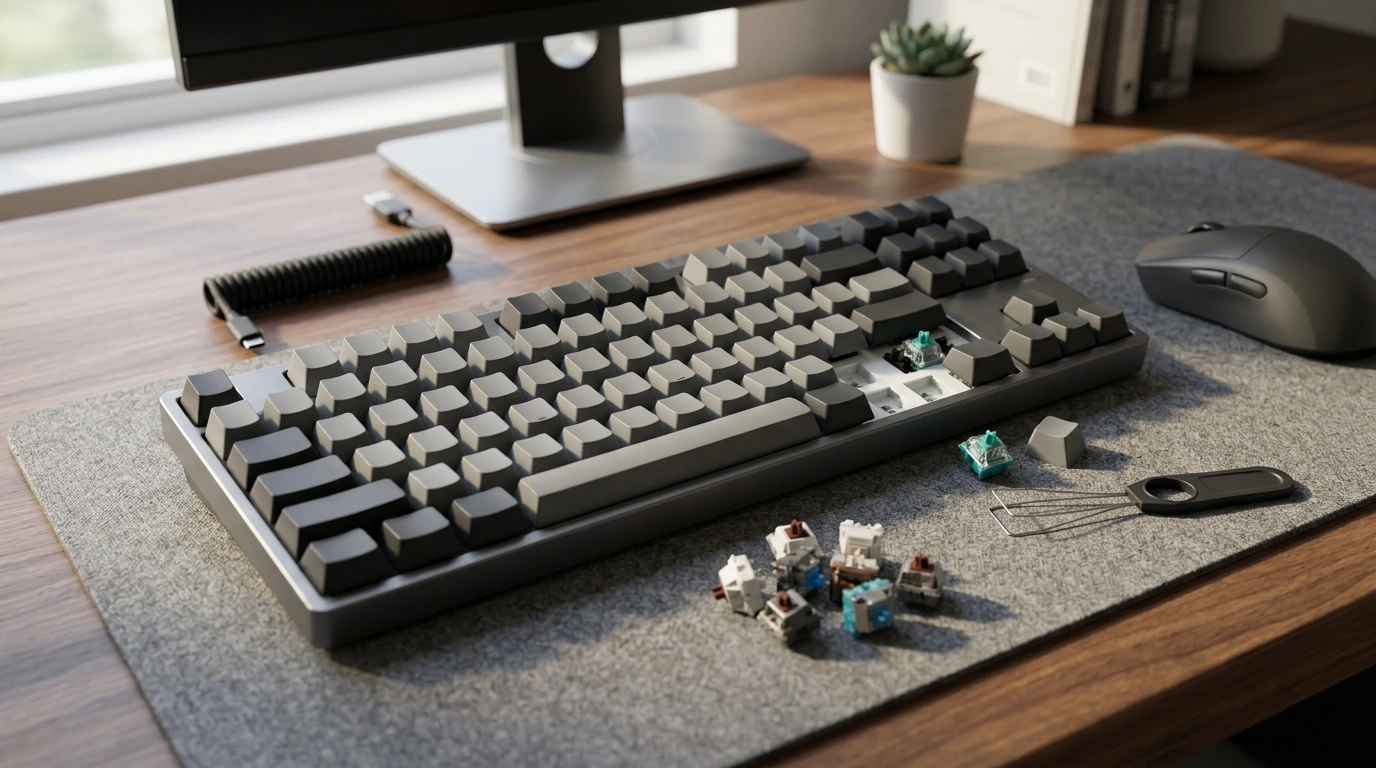
Hot swap support is one of the most practical upgrades in modern mechanical keyboards. Instead of committing to one feel forever, you can pull a switch and install a different one in minutes—no soldering iron, no permanent modifications. That’s valuable for both gamers dialing in actuation feel and typists chasing a specific sound signature.
- Swap mechanical switches to change feel (linear, tactile, clicky) without permanent modifications
- Easy maintenance: replace a single failing or inconsistent switch instead of the whole board
- Experiment-friendly for sound tuning (deeper “thock” vs sharper “clack”) and actuation preference
- Best practice: pull caps and switches straight up with proper tools to protect sockets and plates
Choosing a Switch Feel (Quick Guide)
| Switch type | Feel | Typical strengths |
|---|---|---|
| Linear | Smooth, no bump | Fast repeated presses; consistent gaming feel |
| Tactile | Noticeable bump | Typing accuracy; feedback without loud click |
| Clicky | Bump + click sound | Distinct feedback; not ideal for shared spaces |
Wireless Performance for Gaming and Work
Wireless keyboards keep a setup clean and flexible, but performance depends on the connection mode and your environment. For productivity and multi-device switching, Bluetooth is convenient and widely supported. For gaming, many users prefer a dedicated 2.4 GHz receiver (when available) for a more consistent, “plug-and-play” feel.
For deeper technical references, the Bluetooth Core Specification explains Bluetooth standards, and the USB HID overview provides background on how keyboards communicate over USB.
Connection Modes Compared
| Mode | Best for | Considerations |
|---|---|---|
| Bluetooth | Laptops/tablets; multi-device setups | May prioritize compatibility and battery life over peak responsiveness |
| 2.4 GHz receiver (if supported) | Gaming-focused setups | Can be more sensitive to USB port placement and RF interference |
| USB wired | Tournaments, charging, troubleshooting | Cable management; limited mobility |
Keycap Feel, Sound, and Comfort Tweaks
For a helpful primer on rollover concepts (useful when evaluating multi-key input behavior), see Deskthority’s overview of NKRO and keyboard matrix concepts.
Simple Upgrades That Change the Experience
| Upgrade | What it improves | Effort level |
|---|---|---|
| Desk mat | Reduces resonance; smoother feel | Low |
| Stabilizer tuning | Less rattle; cleaner spacebar sound | Medium |
| Switch swap | Feel/sound personalization | Low–Medium |
| Keycap swap | Texture, profile comfort, sound | Low |
Setup Checklist: Getting the Most Out of a Compact Wireless Board
Quick Troubleshooting Map
| Symptom | Likely cause | Fast fix |
|---|---|---|
| Dropped inputs | Interference or blocked signal | Move receiver/keyboard; avoid metal obstacles |
| Rattly spacebar | Untuned stabilizers | Tune/lube stabs; check cap seating |
| One key not working | Loose switch or bent pin | Reseat switch; inspect pins carefully |
| Unexpected shortcuts | Fn layer confusion | Review default layers; remap if supported |
Hot Swap 71-Key Wireless Mechanical Gaming Keyboard
If the goal is a smaller board that still feels “fully capable,” the Hot Swap 71-Key Wireless Mechanical Gaming Keyboard is a strong fit for gaming-focused control without giving up valuable desk space. Hot-swappable switch support also makes it easy to replace a single problem switch or experiment with different switch styles as preferences change.
Product Snapshot
| Item | Details |
|---|---|
| Model | Hot Swap 71-Key Wireless Mechanical Gaming Keyboard |
| Availability | In stock |
| Price | 150.47 USD |
| Product page | View product |
More In-Stock Picks for a Better Setup
- Muscle Relaxation Toolkit for Total Tension Relief – 3-in-1 Bundle for Deep Muscle Relaxation for post-session recovery and reducing tension after long work or gaming blocks.
- Luxury High-Back Recliner Sofa Set to create a comfortable break zone for controller gaming, streaming, or downtime.
- Vintage Resin Vase to add a clean decorative accent to shelves or a side table near the desk.
FAQ
Do hot-swappable keyboards work with any mechanical switch?
Compatibility depends on the socket type and the switch’s pin configuration (commonly 3-pin or 5-pin). Check what the keyboard supports and never force a switch—bent pins can damage sockets or prevent a proper fit.
Is wireless good enough for gaming?
Wireless can be reliable for gaming when the signal is strong and interference is minimized. For zero-compromise sessions, wired mode is still a dependable option, and placing a receiver closer to the keyboard can improve stability.
What’s the advantage of a 71-key layout over a full-size keyboard?
A 71-key layout frees up mouse space, improves portability, and keeps the desk cleaner while still handling daily tasks well. The main trade-off is relying on Fn layers for some navigation keys and shortcuts.













Leave a comment